> ## Documentation Index
> Fetch the complete documentation index at: https://docs.floris3.com/llms.txt
> Use this file to discover all available pages before exploring further.
# Introduction
> Overview of the Simply Tokenized API.
The current API version **`2026-07-02`** is in **beta** and is only available on the **development** environment. Request and response shapes may change before a stable release. Beta responses include `ST-Api-Version-Beta: true`. See [Versioning](/guides/versioning) for details.
The **Simply Tokenized API** lets integrators and partners programmatically access offerings, orders, accounts, wallets, and transactions for a tenant.
## Base URLs
All API routes are served under the `/_api` prefix:
| Environment | Base URL |
| --------------- | ----------------------------------------- |
| **Development** | `https://dev.go.simplytokenized.com/_api` |
| **Staging** | `https://stage.go.floris3.com/_api` |
| **Live** | `https://go.floris3.com/_api` |
Use **development** when integrating against the beta version `2026-07-02`. Staging and live use their respective Asset Manager tenants and credentials for that environment.
## API surfaces
This documentation covers two integrator-facing surfaces:
| Surface | Description |
| --------------------- | ------------------------------------------------------------------------- |
| **API** | REST endpoints under `/_api` for offerings, orders, accounts, and wallets |
| **Outbound webhooks** | Event notifications POSTed to your HTTPS endpoint when resources change |
## Resource model
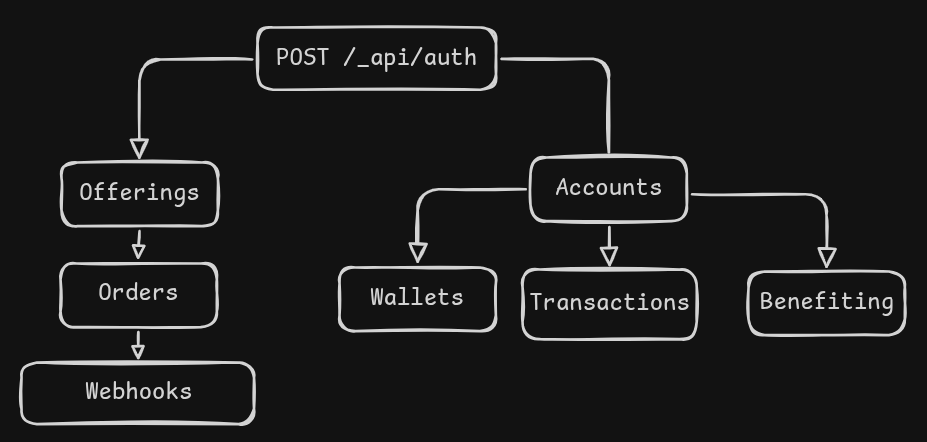
Authenticate once, then work with two resource trees: **offerings & orders** on the left, **accounts & related records** on the right.
## Getting credentials
API credentials (`client_id` / `client_secret`) are created in the Asset Manager dashboard under **Administration → API Access → Tokens**. Each credential is scoped to one or more resource categories (`OFFERINGS`, `ACCOUNT`, `ORDER`, `WALLET`).
## Next steps
Authenticate and make your first API call.
Learn about tokens, scopes, and headers.
Convert token amounts to smallest-unit strings for orders and balances.
Browse all endpoints with schemas and examples.
Receive real-time event notifications.